AI chatbot ROI for small business sounded like marketing fluff to me too — until I got a $600 customer support bill for a single month and had to do something about it.
Let me back up.
I run a small side business (nothing huge, just a niche online store) alongside my content work, and last winter I was drowning. Customers messaged at 11 PM asking where their order was. Someone wanted a refund at 2 AM. I was answering the same five questions over and over, every single day, and it was eating hours I didn’t have.
A friend who runs a Shopify store told me she’d switched to an AI chatbot and cut her response time from hours to seconds. I was skeptical. I pictured one of those clunky “Sorry, I didn’t understand that” bots from 2015 that make you want to throw your phone.
So I tried one myself. Here’s exactly what happened, what it actually cost, what it saved, and where it completely fell flat.
What I Actually Set Up (And What It Cost)
I went with Tidio because it had a free trial and didn’t need a developer to set up — which mattered a lot since I’m not technical.
Setup took about an hour, mostly spent uploading my FAQ page and past customer emails so the AI (called Lyro) could learn my product details, shipping policy, and return process.
The Starter plan ran $29 a month for 100 AI conversations. I figured worst case, I’d cancel after a month.
I did NOT expect what happened next.
Week One: The Awkward Phase
I’ll be honest — the first week was rough. The bot answered basic questions fine (“What are your shipping times?”) but completely fumbled anything slightly unusual. One customer asked about combining two discount codes, and the bot just looped back to a generic “Let me connect you with our team” message.
That’s actually normal, and something nobody tells you upfront: an AI chatbot isn’t plug-and-play smart on day one. It learns from what you feed it and from real conversations over time. I had to go back in and add more specific answers about edge cases — discount stacking, international shipping delays, sizing questions.
Lesson learned: budget a real week or two of tweaking before you judge whether it’s working.
The Numbers That Actually Convinced Me
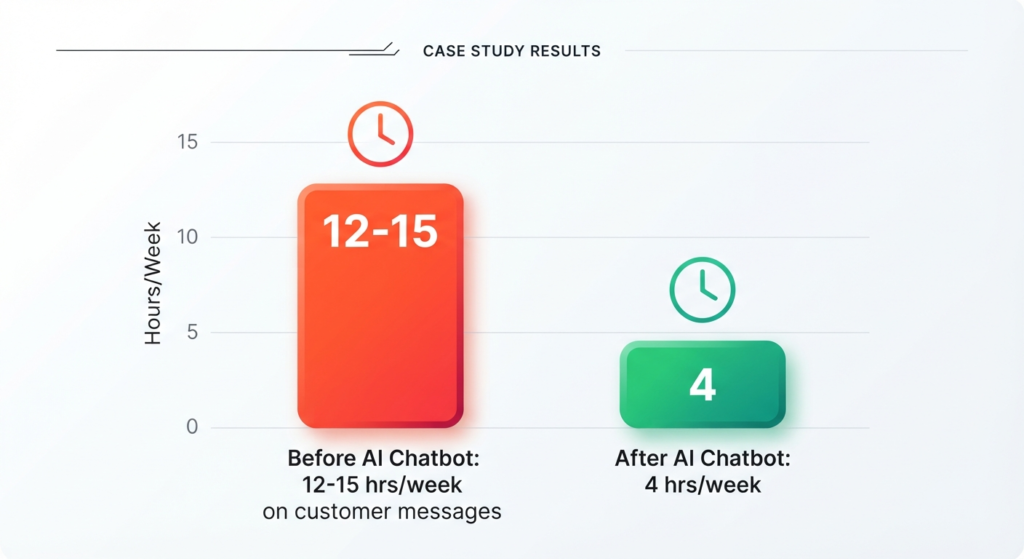
By month two, things shifted. Here’s the honest before-and-after from my own tracking:
- Before: I spent roughly 12–15 hours a week on customer messages
- After: That dropped to about 4 hours a week, mostly handling the tricky stuff the bot flagged for me
- Response time: Went from “whenever I checked my phone” to instant, 24/7
- Refund requests handled automatically: Around 60% didn’t need me at all
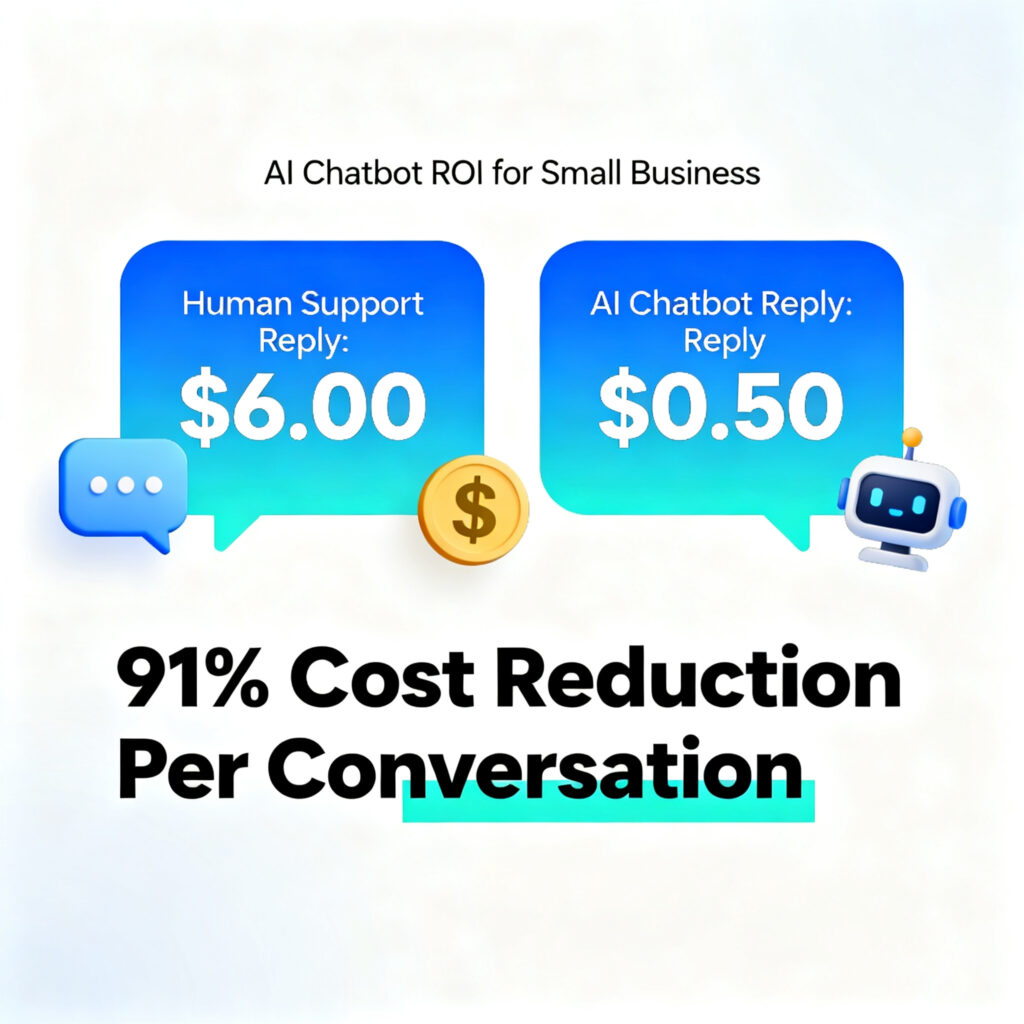
This tracks with what the wider data shows too. Industry research from IBM and Forrester found a human support reply costs around $6, while an AI-handled one costs closer to $0.50 — a real gap once you’re handling dozens of messages a day. And that’s basically what I felt in my own inbox, even at a much smaller scale than a big company.
The AI chatbot ROI for small business really comes down to two things: money saved on time you’d otherwise pay for (or lose), and revenue you’d have missed entirely — like that customer who messages at midnight and just leaves if nobody answers.
Step-by-Step: How I’d Set This Up If I Started Over
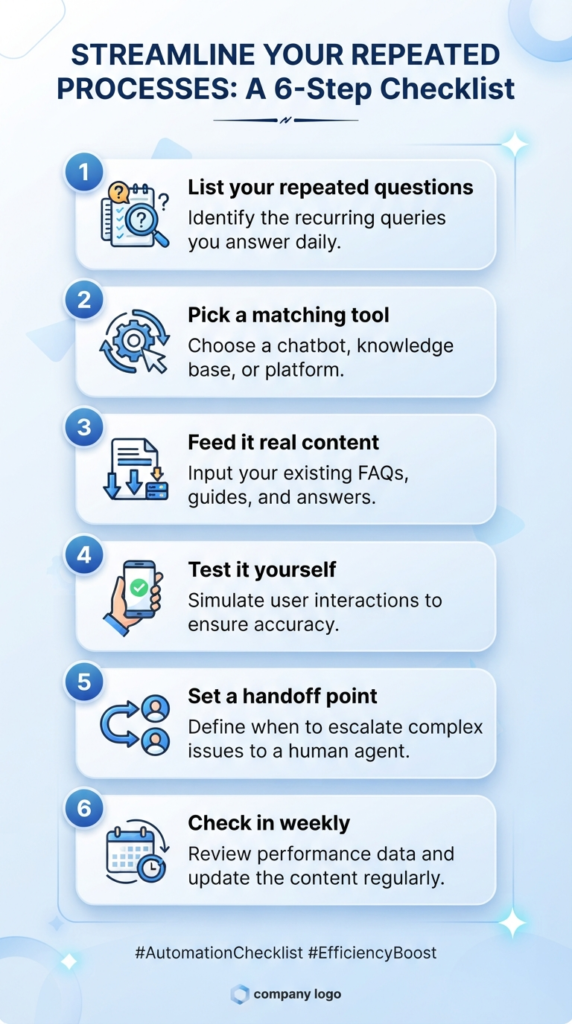
If you’re thinking about trying this yourself, here’s the order I’d actually do it in, knowing what I know now:
- List your real, repeated questions first. Don’t guess. Go through your last month of messages and write down the top 10 things people actually ask.
- Pick a tool that matches your platform. I used Tidio because it plugs into most website builders easily. If you’re on Shopify specifically, a lot of small stores lean toward Gorgias instead. Freshdesk has a genuinely usable free tier if you want to test the waters before paying anything.
- Feed it your actual content, not generic answers. Upload your real FAQ, your real return policy, your real shipping times. Vague training data gives you a vague, useless bot.
- Test it yourself first. Ask it weird questions. Try to break it. Fix the gaps before customers find them.
- Set a clear handoff point. Decide when the bot should say “let me get a human” instead of guessing. This alone saved me from a few awkward customer moments.
- Check in weekly for the first month. Read the conversation logs. You’ll spot patterns in what confuses the AI, and fixing those early makes a huge difference.
Mistakes I Made (So You Don’t Have To)
I didn’t set boundaries early enough. For the first two weeks, the bot tried to answer everything, including things it clearly shouldn’t have guessed at, like specific delivery dates for delayed orders. That led to two annoyed customers before I added a rule to hand off anything shipping-delay related straight to me.
I underestimated how much setup time actually matters. I rushed the FAQ upload the first time and it showed. Customers got half-right answers for about a week before I went back and cleaned it up properly.
I almost judged it too early. If I’d cancelled after week one based on those clunky early conversations, I would have missed the actual payoff, which showed up around week three or four.
Where the ROI Falls Apart
I want to be straight with you here, because a lot of articles oversell this. A chatbot won’t save you money if:
- Your business gets very few repeat questions (low message volume means the subscription cost might not be worth it)
- Your product or service involves a lot of nuance that genuinely needs a human judgment call every time
- You never go back and improve the bot’s training — it stays dumb if you ignore it
For a business getting maybe 20 messages a month total, paying $29+ for an AI chatbot probably isn’t worth it yet. The break-even point really shows up once you’re dealing with repetitive volume — dozens of similar questions a week.
Real Example: A Friend’s Experience
My friend with the Shopify store mentioned earlier used a similar setup and told me her chatbot handled about 70% of her support tickets on its own within the first two months, mostly order status and sizing questions. She kept the human touch for anything involving complaints or custom orders — smart move, because customers can tell when they’re getting a canned response to something personal.
Common Mistakes to Avoid
- Don’t skip the training phase — a bot fed with vague or outdated info will frustrate customers, not help them
- Don’t remove the human option entirely — always leave an easy way to reach a real person
- Don’t set it and forget it — check conversation logs at least monthly
- Don’t pick the most expensive tool assuming it’s automatically better for your size of business
Final Thoughts
I went into this expecting a gimmick and came out actually surprised by how much time it freed up, once I got past that clunky first couple of weeks. AI chatbot ROI for small business isn’t instant, and it’s not magic — it takes some setup, some patience, and a willingness to fix things when the bot gets it wrong.
But for me, going from 12+ hours a week answering the same questions to about 4 hours of actually meaningful customer conversations? That was worth the $29 a month and then some.
If you’re on the fence, start small. Most tools have free trials or free tiers. Test it for a month, track your own time honestly, and see if the math works for your specific situation — because your numbers might look completely different from mine.
For more information, visit: APKSITE1
Frequently Asked Questions
Is an AI chatbot actually worth it for a small business, or just for big companies?
It depends entirely on your message volume. If you’re getting a steady stream of repeat questions every week, it usually pays for itself within a couple of months through saved time alone. If you get very few customer messages, it might not be worth the subscription yet.
How long does it take to see real results from an AI chatbot?
In my experience, the first one to two weeks are rough while the bot is learning. Most of the real payoff showed up around week three or four, once I’d gone back and fixed the gaps in its training.
Can an AI chatbot completely replace human customer support?
No, and it shouldn’t try to. It’s best at handling repetitive questions — shipping times, order status, basic FAQs. Anything emotional, complex, or unusual still needs a real person, and good setups always leave an easy way to reach one.
What’s a reasonable monthly budget to start testing this?
Most beginner-friendly tools run somewhere between $15 and $40 a month for a starter plan, and several offer free tiers or trials so you can test before committing any money.
Do I need to know how to code to set one up?
No. The tool I used didn’t require any coding — just uploading FAQ content and adjusting settings through a normal dashboard.