
My cousin bought his Redmi Note 12 5G about three months after I got my Samsung Galaxy A54. Same price range, bought around the same time. But every time we’d sit together at a café or a busy street corner, his phone would show 5G in the top bar while mine sat there flashing LTE like it was 2019.
I spent two weeks convinced I’d somehow bought a defective unit. I even visited a Samsung service center once. The technician looked at my phone for 30 seconds, went into settings, tapped a couple of things, and handed it back with 5G showing. I felt equal parts relieved and embarrassed.
That one small moment is why I wrote this. Because if I — someone who considers himself reasonably tech-savvy — spent weeks on a problem that had a 30-second fix, a lot of other people are probably in the same boat.
How to Convert 4G to 5G on Any Android Phone (2026)
Before Anything Else — Does Your Phone Actually Have 5G Hardware?
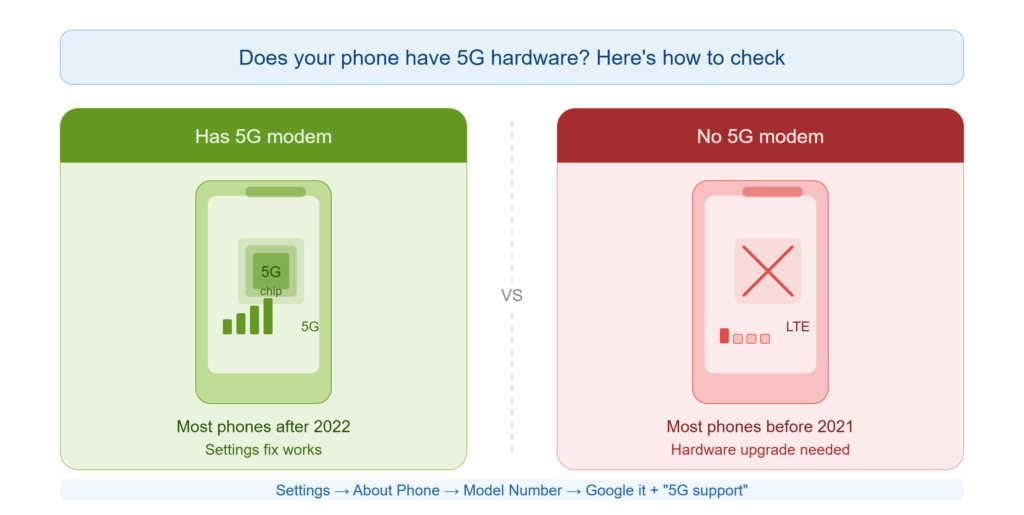
This is the one thing most guides skip right past, and it matters. Because if your phone doesn’t have a 5G modem physically built into it, no setting tweak in the world is going to help. That’s not a software thing. It’s a chip.
Here’s how to check, without Googling your life away:
- Open Settings → About Phone
- Note your exact Model Number (something like SM-A546B or 2201117TG)
- Type that model number into Google followed by “specs 5G”
- If the spec sheet says “5G NR” — you’re good. The hardware is there.
As a rough rule: most Android phones launched after mid-2022 at mid-range pricing and above include 5G. Phones from before 2021 almost universally don’t. The grey zone is 2021–2022 — some do, many don’t, and you really do need to check individually.
Confirmed 5G devices as of 2026 that are still widely in use: Samsung Galaxy A34, A54, A55, S23, S24 series; Xiaomi 12, 13, 14 series; Redmi Note 12 5G, Note 13 5G; Realme 10 Pro 5G, 12 Pro 5G; iPhone 13, 14, 15, and 16 series; OnePlus Nord CE 3, OnePlus 12.
Why Is 5G Off by Default on So Many Phones?
This part confused me for a while. Why would a company sell you a 5G phone with 5G switched off?
Turns out there are a few real reasons:
Battery life. 5G radios draw more power than 4G ones. When manufacturers are competing on how long a phone lasts on a single charge, shipping with 5G disabled on Auto is an easy way to look better on benchmark tests.
Network readiness. When your phone was manufactured and shipped to stores, 5G coverage in your city may not have existed yet. Brands sometimes ship conservative defaults to avoid complaints from users in non-covered areas.
Carrier agreements. In some markets, 5G gets turned on only after a carrier confirms your SIM plan supports it. Your phone may literally be waiting for a signal it hasn’t received yet.
None of this means your phone is broken. It just means you need to do one of the following things.
Method 1: The Settings Menu Fix (Works for Most People)
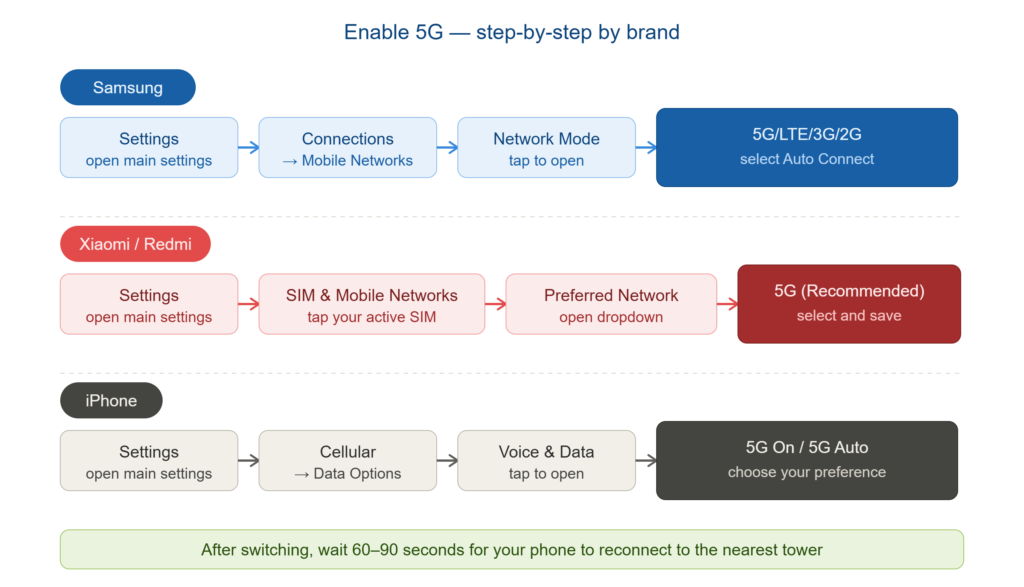
This is where I’d start. It takes under a minute, requires no technical knowledge, and fixes the issue for the majority of people.
For Samsung Galaxy phones:
Go to Settings → Connections → Mobile Networks → Network Mode
You’ll see a dropdown. Select 5G/LTE/3G/2G (Auto Connect). Done. Your phone will now hunt for 5G whenever it’s available and fall back to LTE when it isn’t.
For Xiaomi, Redmi, and POCO phones:
Head to Settings → SIM Cards & Mobile Networks, tap your active SIM, then look for Preferred Network Type. Change it to 5G (Recommended) or 5G/4G/3G/2G Auto.
For Realme and OPPO phones:
Go to Settings → SIM & Network → SIM 1 (or whichever SIM you use for data) → Network Type. Select 5G Auto from the list.
For iPhones (13 and later):
Settings → Cellular → Cellular Data Options → Voice & Data. Choose 5G On if you want it always active, or 5G Auto to let the phone decide based on battery and availability.
One thing I noticed on my A54 — after switching to 5G Auto, the phone didn’t immediately jump to 5G. It took about 90 seconds for the radio to re-register with the nearest tower. So give it a moment before assuming it didn’t work.
Method 2: The Hidden Dialer Code (For When the Settings Menu Doesn’t Show 5G)
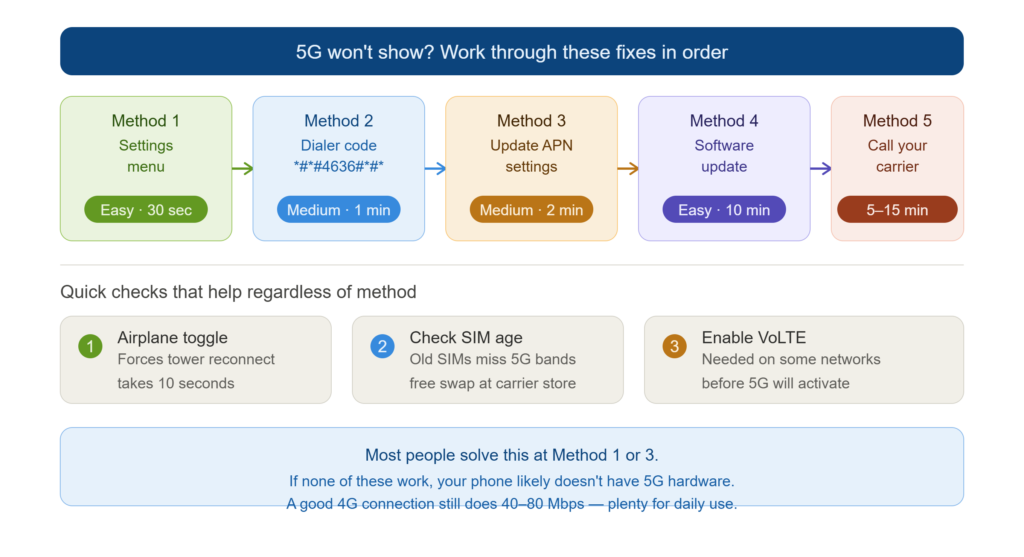
Some phones — particularly older or budget ones that received a mid-cycle 5G firmware update — don’t expose the 5G toggle clearly in the regular settings menu. The option is there, buried deeper. Here’s how to reach it.
Open your Phone app and dial: *#*#4636#*#*
This opens what’s called the Android Testing Menu (or Phone Info panel). It’s a diagnostic screen that’s been part of Android for years. Tap on Phone Information.
Scroll until you find Set Preferred Network Type. From the dropdown, select NR/LTE/WCDMA/GSM — NR stands for New Radio, which is 5G’s technical name.
Exit the menu and wait a minute. Check your signal bar.
One honest warning here: this is an engineering screen. It’s safe to change the network type setting. But don’t start tapping other things in there out of curiosity. Some options in that menu can disrupt your call and data settings in ways that take effort to undo.
Method 3: Fix Your APN Settings
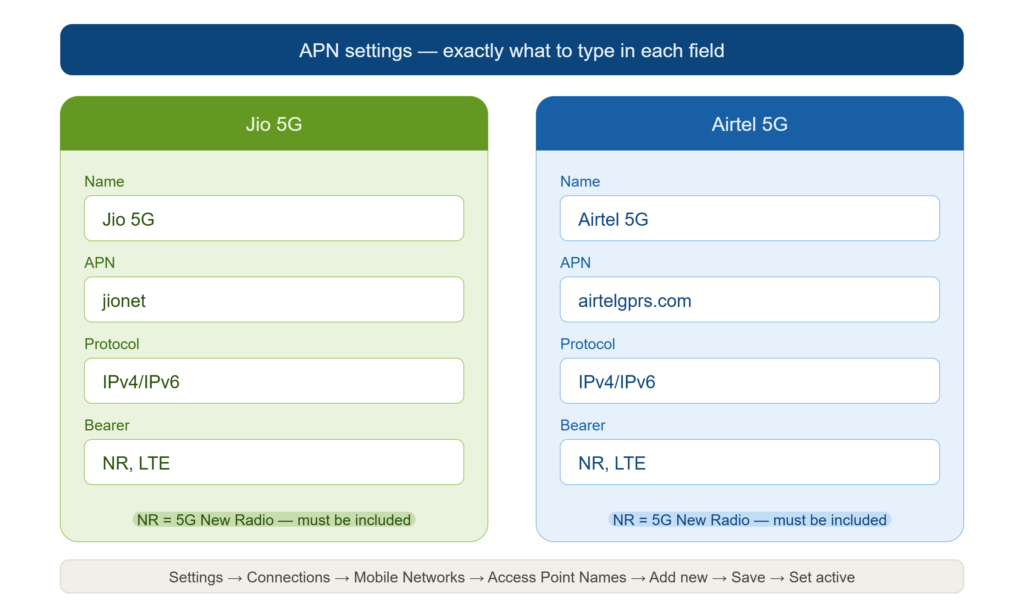
This one trips up a lot of people and barely anyone talks about it. APN stands for Access Point Name — it’s essentially the configuration your phone uses to communicate with your carrier’s network. If it’s outdated or incorrectly set, your phone can literally be standing next to a 5G tower and still refuse to connect to it.
The fix is to manually enter the correct APN settings for your carrier.
For Jio 5G:
Go to Settings → Connections → Mobile Networks → Access Point Names. Tap the “+” or “Add” button, then enter:
- Name: Jio 5G
- APN: jionet
- Protocol: IPv4/IPv6
- Bearer: NR, LTE
Save it, then tap on it to set it as your active APN.
For Airtel 5G:
Same process, but use:
- Name: Airtel 5G
- APN: airtelgprs.com
- Protocol: IPv4/IPv6
- Bearer: NR, LTE
For users outside India: Check your carrier’s official website for their 5G APN settings — most publish them in the support section. The key field to look for is the Bearer, which should include NR for 5G to work.
I tried this on a friend’s Realme phone that was stuck on 4G despite being in a strong Airtel 5G zone. Updating the APN was all it took. Switched to 5G within two minutes of saving the new settings.
Method 4: Run a Software Update (Seriously, Don’t Skip This)
I know. Updates feel like a chore. But carriers and phone makers push 5G activation patches through regular OTA (Over-the-Air) software updates — and these are easy to miss if you’ve got auto-updates turned off.
Go to Settings → Software Update → Download and Install.
If there’s a pending update, install it and restart your phone. Then go back to the Network Mode settings and check again — sometimes the 5G option appears after the update where it wasn’t visible before.
This happened to a friend who had a Xiaomi 11T. He’d skipped three updates in a row. After finally updating, the 5G toggle showed up in settings automatically. His phone had the hardware the whole time; it just needed the software to recognize it properly.
Method 5: Call Your Carrier
Sometimes the issue genuinely isn’t on your end. Some carriers, particularly in South Asia and parts of Southeast Asia, require 5G to be manually activated at the account level — meaning your SIM plan might not have 5G toggled on even if the coverage exists in your area.
Call your carrier’s customer support and ask specifically: “Is 5G enabled on my number? Can you activate it?” It usually takes them about five minutes on their end.
Also worth checking: if your SIM card is more than four or five years old, it may not support 5G bands even if your phone does. A SIM replacement is usually free or costs next to nothing at the carrier’s store, and it takes about 15 minutes.
What If Your Phone Genuinely Doesn’t Have 5G?
If after checking specs you confirm there’s no 5G modem in your phone — that’s a hardware limitation. Nothing to feel bad about. A lot of solid, perfectly capable phones from 2020 and 2021 simply don’t have it.
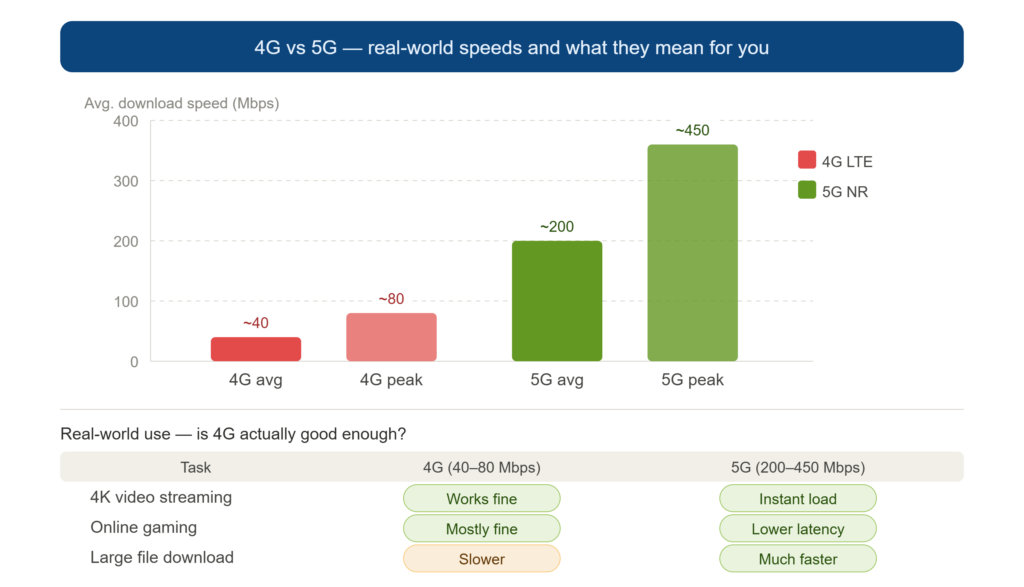
The good news: an optimized 4G connection in a decent coverage area can still deliver 40–80 Mbps. That’s enough for 4K YouTube, competitive mobile gaming, video calls, and virtually everything else daily life requires. 5G is noticeably faster when you’re in a congested area like a stadium or a busy market — but for most home and office use, the difference is less dramatic than the marketing suggests.
If you’re actively considering an upgrade, budget 5G Android phones in 2026 start around Rs. 10,000–12,000 in India and Pakistan, with solid options from Redmi, Realme, and Samsung at that range.
A Few Things That Actually Help Speed, Regardless of Network Generation
While you’re sorting out your 5G situation, these habits genuinely make a difference:
Toggle Airplane Mode on and off when your signal feels weak. It forces your phone to drop the current connection and re-register with nearby towers — often landing on a stronger one.
Keep your phone software updated. Modem firmware improves with updates, which translates to better signal handling.
VoLTE (Voice over LTE) being enabled on your account improves both call quality and data speeds on 4G, and it’s a prerequisite on some networks for 5G to function correctly.
Move away from thick concrete walls when possible. 5G in particular — especially the mmWave variant — is absorbed heavily by building materials.
To activate with Android App, then:
One Last Thing
When I finally saw that 5G icon on my Samsung that day at the service center, the technician told me he sees this issue at least four or five times a week. People coming in convinced their phone is broken, when it’s a settings toggle sitting two menus deep.
So if your phone is newer, check the settings first. If it’s showing LTE and you know 5G coverage exists around you, there’s a very good chance you’re one setting change away from fixing it yourself — no service center visit required.
Try Method 1 first. If that doesn’t work, go through the rest in order. Most people find their answer somewhere between Method 1 and Method 3.