
How I Accidentally Built My First AI Agent {#how-i-accidentally-built-my-first-ai-agent}
How to build AI agents was the last thing on my mind when I started this whole journey. I just wanted to stop copy-pasting the same customer emails into ChatGPT every single morning.
I was running a small content business, and every day I’d spend 45 minutes doing the same thing — paste email, read response, update spreadsheet, draft reply. Over and over. It was mind-numbing.
A friend told me, “just build an agent for that.” I laughed. I’m not a developer. I barely know what an API is.
But six hours, two YouTube videos, and one very patient Reddit thread later — I had something that read my emails, categorized them, and drafted replies. It wasn’t perfect. It hallucinated a client’s name twice. But it worked.
That was the moment I got obsessed with AI agents. And if you’re here reading this, I’m guessing you’re about to go down the same rabbit hole. Let me save you the six hours of confusion.
What Is an AI Agent — And Why It’s Not Just a Chatbot {#what-is-an-ai-agent}
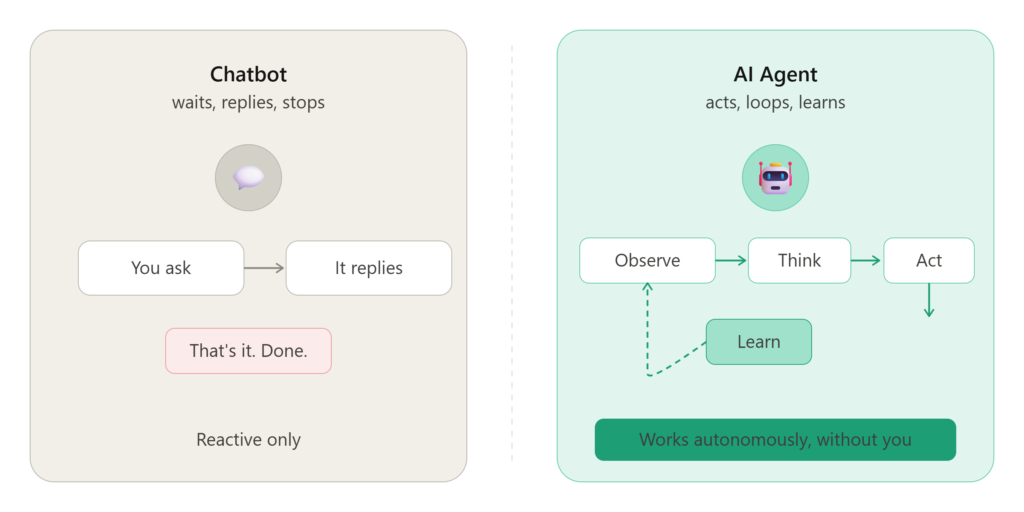
Most people mix these up, so let’s kill this confusion fast.
A chatbot answers questions. You ask, it replies, that’s it. It’s reactive.
An AI agent actually does things. It has a goal, it figures out the steps to reach that goal, it uses tools to take action, and it keeps going until the job is done — often without you clicking a single button.
Think of it this way: ChatGPT is like a really smart assistant sitting at a desk waiting for you to talk to it. An AI agent is like that same assistant, except they also have access to your email, your calendar, your browser, and they’re proactively working through your to-do list while you’re in a meeting.
The difference isn’t just technical. It’s a completely different way of working.
In 2026, AI agents can browse the web, write and run code, send emails, book appointments, pull data from databases, post to social media, and loop back to check their own work. The “observe → think → act → learn” loop is what separates them from everything that came before.
What You Actually Need Before You Start {#what-you-actually-need-before-you-start}
Good news: the barrier to learning how to build AI agents has dropped massively. Here’s the honest list of what you need:
If you want to code your agent:
- Basic Python skills (like, “I can follow a tutorial” level)
- An API key from OpenAI, Anthropic, or Google
- A free account on GitHub
- About $5–$10/month in API credits to experiment
If you want no-code:
- A computer and internet connection
- An account on Make, n8n, or Relevance AI (all have free tiers)
- A clear idea of what you want the agent to actually do
The number one mistake beginners make is starting without a defined goal. Before touching any tool, write this sentence: “My agent should [do X] when [Y happens], and the result should be [Z].”
If you can’t complete that sentence, you’re not ready to build yet. And that’s fine — figuring that out is step one.
The 4 Core Components of Every AI Agent {#the-4-core-components-of-every-ai-agent}
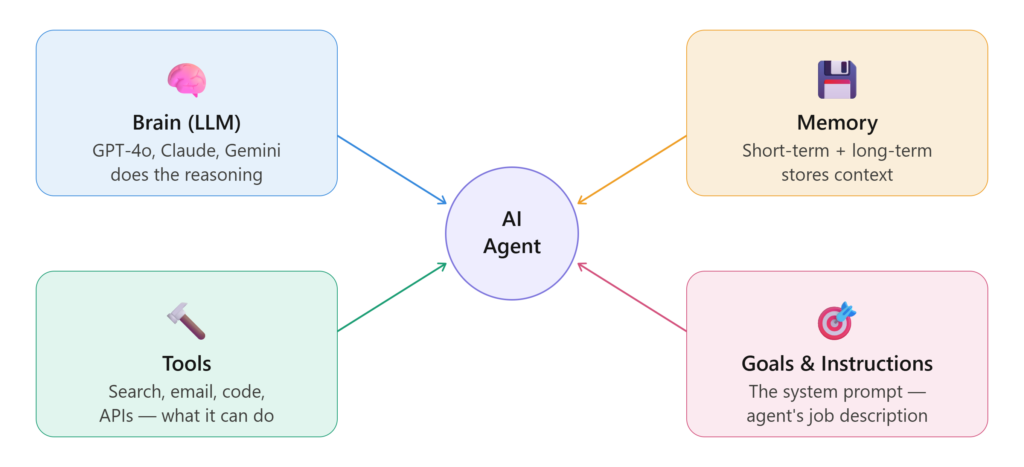
No matter what framework or tool you use, every AI agent you’ll ever build is made of the same four parts. Understand these and everything else gets easier.
1. The Brain (LLM)
This is the large language model doing the reasoning — GPT-4o, Claude 3.5, Gemini 1.5, or an open-source model like Llama 3. It reads the situation and decides what to do next. In 2026, most teams pick their model based on cost, speed, and how well it handles their specific task.
2. Memory
Agents need to remember things. There are two types: short-term memory (what happened in this session) and long-term memory (stored in a database it can query later). Without memory, your agent resets every time and can’t learn from past actions.
3. Tools
This is where agents get powerful. Tools are things the agent can do — search the web, run code, read files, send emails, call APIs. The more useful tools you give it, the more it can accomplish. But more isn’t always better — giving an agent 30 tools when it only needs 3 just confuses it.
4. Goals and Instructions (System Prompt)
This is your agent’s job description. You write it in plain English. “You are a customer support agent. Your job is to…” The quality of this instruction matters more than most people realize. I’ve seen the exact same agent produce wildly different results just from changing the system prompt.
Best Frameworks to Build AI Agents in 2026 {#best-frameworks-to-build-ai-agents-in-2026}
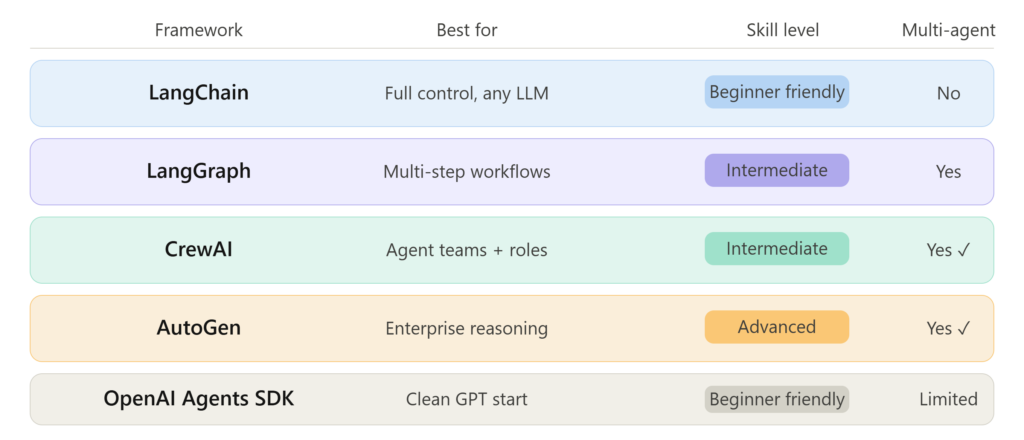
This is where most beginners get overwhelmed because there are a lot of options now. Here’s what’s actually being used in the real world:
LangChain
Still the most popular framework for building AI agents with Python. It has the biggest community, the most tutorials, and works with basically every LLM. If you’re new to coding agents, start here. The downside: it can feel overly complex for simple tasks.
Best for: Developers who want full control and flexibility.
LangGraph
Think of this as LangChain’s more structured sibling. It lets you build agents as “graphs” — which sounds complicated but actually makes multi-step workflows much easier to visualize and debug. A lot of production teams in 2026 have moved from LangChain to LangGraph for anything complex.
Best for: Multi-step agents and workflows where order matters.
CrewAI
This one’s specifically for multi-agent systems — where multiple specialized agents work together like a team. You assign roles (researcher, writer, editor) and they collaborate to complete a task. I’ve used this for content pipelines and it’s genuinely impressive.
Best for: Teams of agents tackling complex projects together.
AutoGen (by Microsoft)
Another multi-agent framework, slightly more technical than CrewAI but incredibly powerful for tasks that involve back-and-forth reasoning between agents. Popular in enterprise settings.
Best for: Complex reasoning tasks and enterprise workflows.
OpenAI Agents SDK
OpenAI released their own lightweight framework in 2025 and it’s become a favorite for people already in the OpenAI ecosystem. Clean, simple, well-documented.
Best for: Beginners who want a clean start with GPT models.
How to Build AI Agents Without Writing Code {#how-to-build-ai-agents-without-writing-code}
Not a developer? You’re not locked out. Some of the most useful agents I’ve seen were built by marketers, operations managers, and small business owners using no-code tools.
Relevance AI
This is probably the most beginner-friendly platform for building AI agents right now. You set up “tools” using a visual interface, connect them to an LLM, and deploy your agent. No terminal, no pip install, no drama. Their free tier is generous enough to get a real agent running.
I used it to build an agent that monitors a Slack channel for customer complaints, pulls the relevant data from a CRM, and drafts a response for a human to approve. Took about 3 hours, zero code.
n8n
More of a workflow automation tool with strong AI agent features baked in. If you’ve used Zapier, n8n is like Zapier but open-source, more powerful, and with actual AI agent nodes built in. You can self-host it too, which matters if you’re dealing with sensitive data.
Make (formerly Integromat)
Great for connecting AI actions across dozens of apps. Solid choice if your agent needs to touch tools like Airtable, Google Sheets, Gmail, Slack, and Notion all in one workflow.
Flowise
An open-source, visual drag-and-drop tool for building LangChain-based agents. If you want the power of LangChain without writing raw Python, Flowise is your bridge. You can self-host it for free.
Step-by-Step: Build Your First AI Agent (With Code) {#step-by-step-build-your-first-ai-agent}
Let’s build something real. This is a simple research agent that searches the web and summarizes results. It uses Python and the OpenAI Agents SDK.
What you’ll need:
- Python 3.10+
openailibrary installed (pip install openai)- An OpenAI API key
Step 1: Install and set up
bash
pip install openaiSet your API key as an environment variable:
bash
export OPENAI_API_KEY="your-key-here"Step 2: Define the agent
python
from openai import OpenAI

client = OpenAI()

def run_agent(user_query: str):
    response = client.chat.completions.create(
        model="gpt-4o",
        messages=[
            {
                "role": "system",
                "content": (
                    "You are a research assistant. When given a topic, "
                    "break it into 3 key questions, answer each one clearly, "
                    "and provide a short summary at the end. "
                    "Always cite your reasoning, not external URLs."
                )
            },
            {
                "role": "user",
                "content": user_query
            }
        ]
    )
    return response.choices[0].message.content

# Run it
result = run_agent("What are the best AI agent frameworks in 2026?")
print(result)
Step 3: Add a tool (web search)
To give your agent real-time search ability, you’d connect it to a search API like Tavily or Serper. Here’s the pattern:
python
import requests

def search_web(query: str) -> str:
    url = "https://api.tavily.com/search"
    payload = {"query": query, "api_key": "your-tavily-key"}
    results = requests.post(url, json=payload).json()
    return "\n".join([r["content"] for r in results.get("results", [])[:3]])
You then pass the search results into the agent’s context before it responds.
Step 4: Add memory
For short-term memory, maintain a messages list and keep appending to it across turns. For long-term memory, store important outputs in a simple database (SQLite works fine for starters) and retrieve relevant chunks when needed.
Step 5: Test, break things, fix them
Seriously — run your agent on 20 different inputs before you consider it “done.” You’ll find edge cases you never expected. My first research agent confidently told a user that a company “was founded in 1847.” It was not.
Real Use Cases That Are Actually Working Right Now {#real-use-cases}
Here’s what real people are building with AI agents in 2026 — not hypothetical examples, actual things being deployed:
Customer support triage — An agent reads incoming support tickets, tags them by urgency and topic, pulls the relevant order history from a database, and drafts a first-response. Human agents only review and send.
Content repurposing — A blog post goes in, and an agent produces a Twitter thread, a LinkedIn post, an email newsletter, and a short YouTube script. What used to take 3 hours takes 4 minutes.
Lead qualification — An agent monitors inbound form submissions, cross-references with CRM data, asks qualifying follow-up questions over email, and scores the lead before a human sales rep ever looks at it.
Competitive monitoring — An agent checks competitor websites, pricing pages, and job postings daily, then sends a Slack digest every morning with changes flagged.
Personal research assistant — Students and professionals are using agents that read PDFs, pull key arguments, and create study notes or project briefs automatically.
All of these are running right now. Most were built by people who didn’t have traditional engineering backgrounds.
Mistakes I Made (So You Don’t Have To) {#mistakes-i-made}
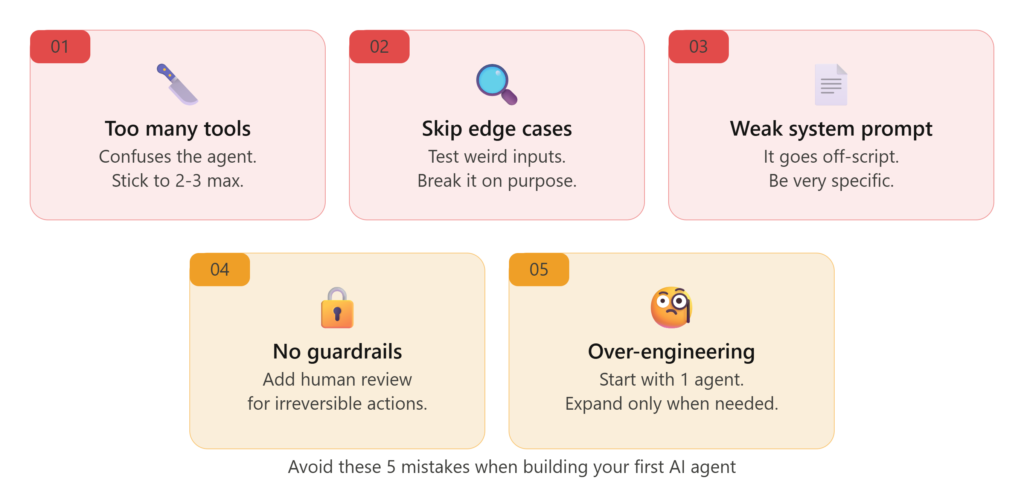
I’ve built a lot of agents over the past year and a half. Here are the embarrassing lessons I had to learn the hard way:
Giving the agent too many tools. I once gave an agent 12 different tools “just in case.” It got confused, picked the wrong tool half the time, and produced garbage. Strip it down to the 2–3 tools it actually needs.
Not testing edge cases. Every agent needs to be stress-tested with weird inputs, missing data, and unexpected scenarios. Build the happy path first, then actively try to break it.
Skipping the system prompt. I got lazy on a project and wrote a one-line system prompt. The agent went off-script constantly. A detailed, well-structured system prompt is worth more than any code optimization.
Not adding guardrails. If your agent can send emails or post content, it will do something embarrassing eventually if you don’t add a human-in-the-loop check for high-stakes actions. Always build in a review step for anything irreversible.
Over-engineering from the start. I spent two weeks designing a complex multi-agent system when a single agent with two tools would have solved the problem. Start simple, expand when you actually need to.
What’s Next After Your First Agent {#whats-next}
Once you’ve got one agent working, you’ll immediately start seeing everywhere else you could use one. That’s normal. The rabbit hole is real.
From here, you can explore:
- Multi-agent systems using CrewAI or LangGraph, where specialized agents hand off tasks to each other
- RAG (Retrieval-Augmented Generation) — giving your agent access to your own documents and knowledge base
- Agent evaluation — tools like LangSmith help you track what your agent does, catch errors, and improve over time
- Deploying your agent — moving from a local script to a live service using FastAPI, Modal, or Vercel
The skill of knowing how to build AI agents is genuinely one of the most valuable things you can learn right now. Not because it’s trendy, but because once you’ve automated something that used to take you hours every week, it’s very hard to go back to doing it manually.
Start small. Pick one annoying, repetitive task in your life or work. Build an agent for that. See what happens.
You’ll figure out the rest as you go — just like I did, copy-pasting emails at 8am, wondering if there had to be a better way.
Have you built your first AI agent yet? What task did you automate? Drop it in the comments — I read every one. For more information, visit APKSITE1.




I liked the distinction between chatbots and AI agents because a lot of beginners still treat them as the same thing. The example of automating email workflows makes the concept feel practical, and it would be interesting to see a follow-up section about how to handle mistakes or hallucinations once an agent starts taking actions on its own.
Really glad that part clicked for you — honestly the chatbot vs agent confusion was the thing that tripped me up the longest too, so I wanted to make sure it was super clear.
And you’re asking exactly the right question. Hallucinations and unexpected actions are probably the scariest part of deploying an agent that’s actually *doing* things — not just talking. I’m working on a follow-up post specifically on this: how to add guardrails, build human-in-the-loop checkpoints, and catch hallucinations before they cause real damage.
I’ll link it here once it’s live — make sure you’re subscribed so you don’t miss it. Thanks for pushing the conversation forward, this is exactly the kind of feedback that shapes what I write next!