
I make money on YouTube without showing my face, and honestly, I fell into it by accident.
A couple of years ago I was trying to grow a tech blog and kept hearing the same advice: “start a YouTube channel to go with it.” Cool, except there was one problem. I hate being on camera. Not shy exactly, just… I’d rather write 2,000 words than say three sentences into a lens. So I put it off for months.
Then one night I stumbled on a channel that was just screen recordings, a calm voiceover, and some royalty-free background music. No face. No fancy setup. It had 40,000 subscribers and the guy was clearly making decent money off it based on the sponsorships he mentioned. That was my “wait, people actually do this?” moment.
So I tried it. And a couple of failed videos, one channel strike scare, and about eight months later, I had something that was quietly paying for my software subscriptions and then some. Not “quit your job” money, but real money for genuinely low effort compared to filming yourself.
Here’s what I actually learned doing it, not theory I read somewhere.
Why You Can Make Money on YouTube Without Showing Your Face in 2026
People assume faceless channels are some kind of loophole or hack. They’re not. YouTube’s algorithm doesn’t care whose face is in the thumbnail — it cares whether people watch, click, and stick around. Some of the biggest channels on the platform (think compilation channels, explainer channels, ASMR, top-10 list videos) have never shown a face and still pull in millions of views.
What actually matters is whether your content solves a problem or entertains someone enough to keep watching. Your face was never the product. The value was.
That said, I want to be upfront: this isn’t a get-rich-quick thing. My first three videos got about 40 views combined. My mom watched two of them. It took consistency and a fair bit of trial and error before anything clicked.
Step 1: Pick a Niche You Can Actually Sustain
This is where I messed up first. I started with a general “tech tips” channel because it seemed broad enough to never run out of ideas. Turns out “broad” also means “unfocused,” and the algorithm doesn’t know who to recommend your channel to if you’re bouncing between topics.
What worked better was narrowing down hard. Instead of “tech tips,” I eventually landed on Android customization specifically, because it’s what I was already writing about for my blog anyway. Reusing research across the blog and channel saved me hours every week.
Good faceless niches that tend to do well:
- Explainer or tutorial content (software, apps, how-to)
- Top 10 / listicle style videos (facts, history, true crime, movies)
- Motivational or quote content with stock footage
- Finance or money tip breakdowns using screen recordings and graphics
- Relaxing content — nature clips, study music, ambient loops
Pick something you could talk about for 50 videos without getting bored. If you’d struggle to name 10 video ideas right now, that’s a sign to narrow the niche further.
Step 2: Set Up a Simple, Cheap Recording Workflow
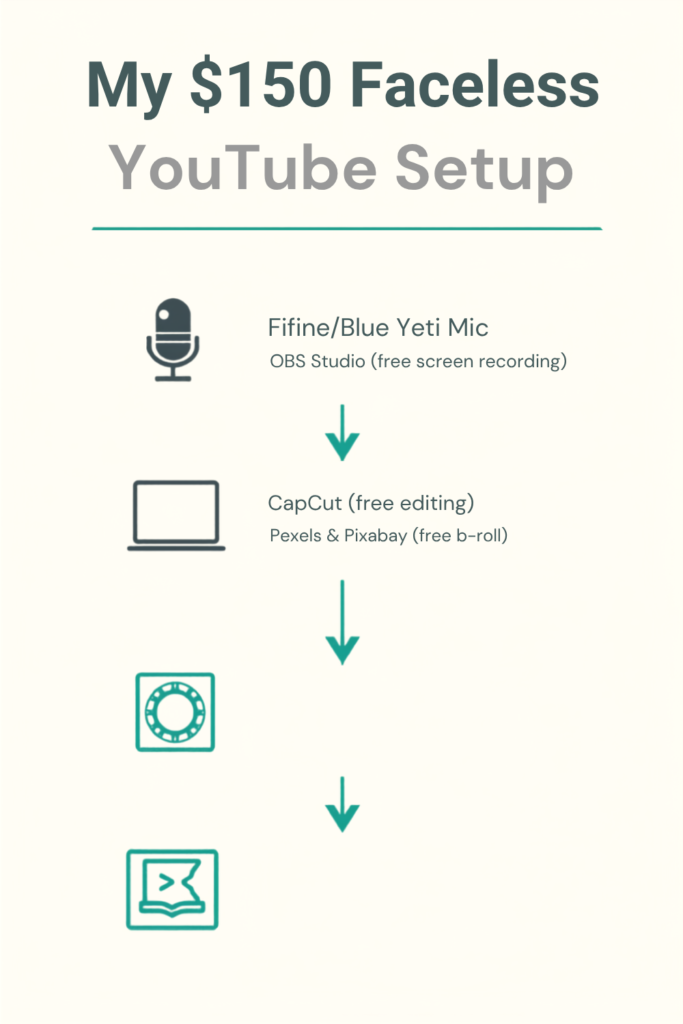
I genuinely thought I’d need a fancy setup. I didn’t. My first “studio” was a laptop, a $30 USB microphone, and free screen recording software.
Here’s roughly what the workflow looked like, and honestly still looks like:
- Script the video in a simple doc — even bullet points work if you’re comfortable talking naturally.
- Record voiceover using a decent USB mic (I used a Fifine mic before upgrading to a Blue Yeti once the channel started earning).
- Screen record or gather footage — I used OBS Studio for screen recordings, and Pexels and Pixabay for free stock footage when the topic needed b-roll.
- Edit in CapCut on desktop, which is free and honestly more intuitive than Premiere Pro for this kind of content. DaVinci Resolve is another solid free option if you want more control.
- Add captions — YouTube’s auto-captions are fine as a starting point, but I always clean them up manually because auto-captions butcher technical terms constantly.
None of this needs to be expensive. My entire setup for the first year cost under $150 total.
Step 3: Nail the Thumbnail and Title (This Matters More Than You Think)
I underestimated this hard at first. I’d spend six hours on a video and five minutes on the thumbnail, then wonder why nobody clicked.
Once I started spending real time on thumbnails — bold text, high contrast colors, a clear visual even without a face in it — click-through rate roughly doubled on similar content. Canva has faceless-friendly thumbnail templates that work well here, since you can use icons, bold typography, and screenshots instead of a headshot.
For titles, curiosity plus clarity wins. “This App Fixed My Phone’s Battery Life” beats “Battery Life Tips” every time, even though they’re covering the same info.
Step 4: Monetize Beyond Just AdSense
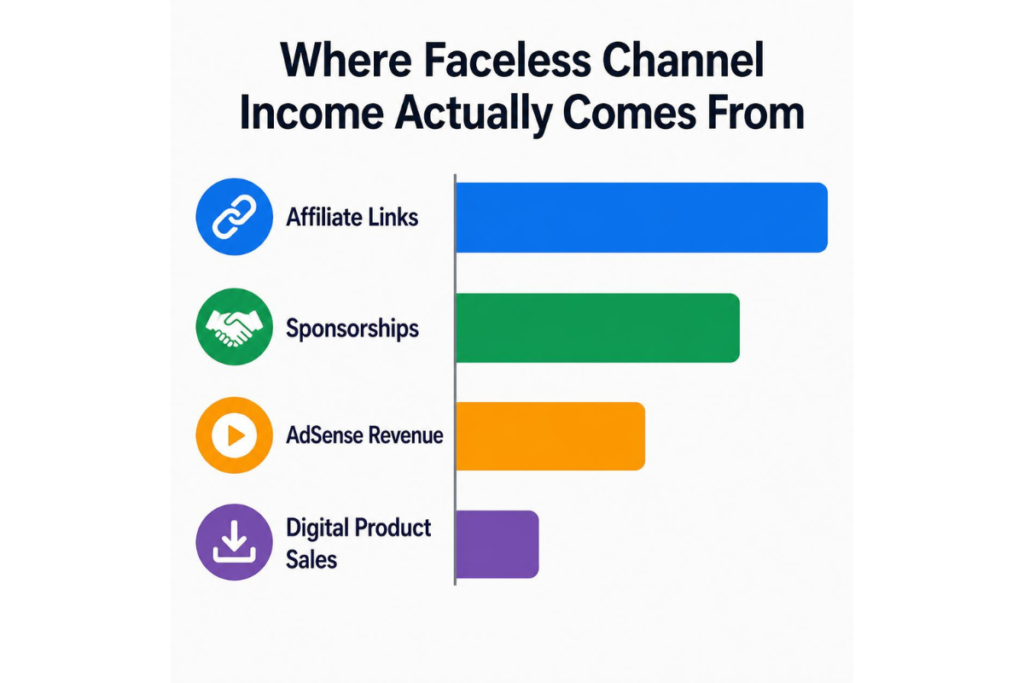
This is the part people searching for how to make money on YouTube without showing your face usually care about most. Ad revenue from YouTube alone was actually the smallest chunk of what I made once things picked up. Here’s where the real money came from, roughly in order of how much it contributed:
- Affiliate links in the description for tools or apps mentioned in the video
- Sponsorships once the channel hit around 10K subscribers — smaller brands were surprisingly open to reaching out first
- YouTube Partner Program ad revenue through the standard monetization once I hit 1,000 subscribers and 4,000 watch hours
- Selling a small digital product (a simple PDF guide) linked in the description, which converted better than I expected given how niche the audience was
If you’re only thinking about AdSense, you’re leaving money on the table. The description box under your video is basically free real estate once people are already watching.
Mistakes I Made (So You Can Skip Them)
I got a copyright claim on one of my early videos for using a music track I thought was royalty-free. It wasn’t — I’d misread the license. Lesson learned: always double-check licensing on YouTube Audio Library or use platforms like Epidemic Sound where the licensing is unambiguous.
I also uploaded inconsistently for a solid four months, sometimes once a week, sometimes nothing for three weeks. Growth basically stalled during that stretch. Once I committed to a fixed schedule, even just one video a week, the channel started climbing again. Consistency mattered more than production quality, which honestly surprised me.
And I over-edited early videos with too many transitions and sound effects, trying to compensate for not showing my face. Viewers didn’t need that. They needed clear information delivered simply. Simpler editing actually performed better in watch time.
A Realistic Timeline
Don’t expect fast results. My channel took about five months to hit 1,000 subscribers, and monetization eligibility came a bit after that once watch hours caught up. Income was small for a long time — we’re talking $20-40 a month at first from ads. It only became meaningful once affiliate links and one small sponsorship kicked in around month nine.
If someone tells you they went from zero to full-time income in a month with a faceless channel, be skeptical. It happens, but it’s rare, and usually involves either an existing audience elsewhere or a very lucky viral hit.
Final Thoughts
If the idea of being on camera is what’s stopped you from starting a channel, that excuse doesn’t really hold up anymore — you genuinely can make money on YouTube without showing your face, and plenty of people already are. Plenty of successful channels are built entirely on voiceovers, screen recordings, and stock footage.
What actually determines whether it works isn’t your face, it’s whether you show up consistently and give people something worth watching. Start small, pick one narrow topic, use free tools you already have access to, and give it a real few months before judging whether it’s working.
If you want, check out the YouTube Creator Academy — it’s free and was genuinely useful when I was starting out, especially the sections on monetization requirements.
For more information, visit: APKSITE1